
Build your own Freedom of Information agent with M365 Copilot
Join hundreds of public sector colleagues to build a declarative FOI agent in Microsoft 365 Copilot Agent Builder. We’ll triage incoming requests against published guidance, hand qualified work over to your existing FOI process, and draft tactful responses — all from inside Outlook.
Watch the recording
The webinar has now finished. Thank you to everyone who got involved. You can view the recording here.
Don’t forget to reach out to your Customer Success Account Manager (CSAM) if you would like to see another webinar in future.
Replay the full session and share it with colleagues who missed the live event.
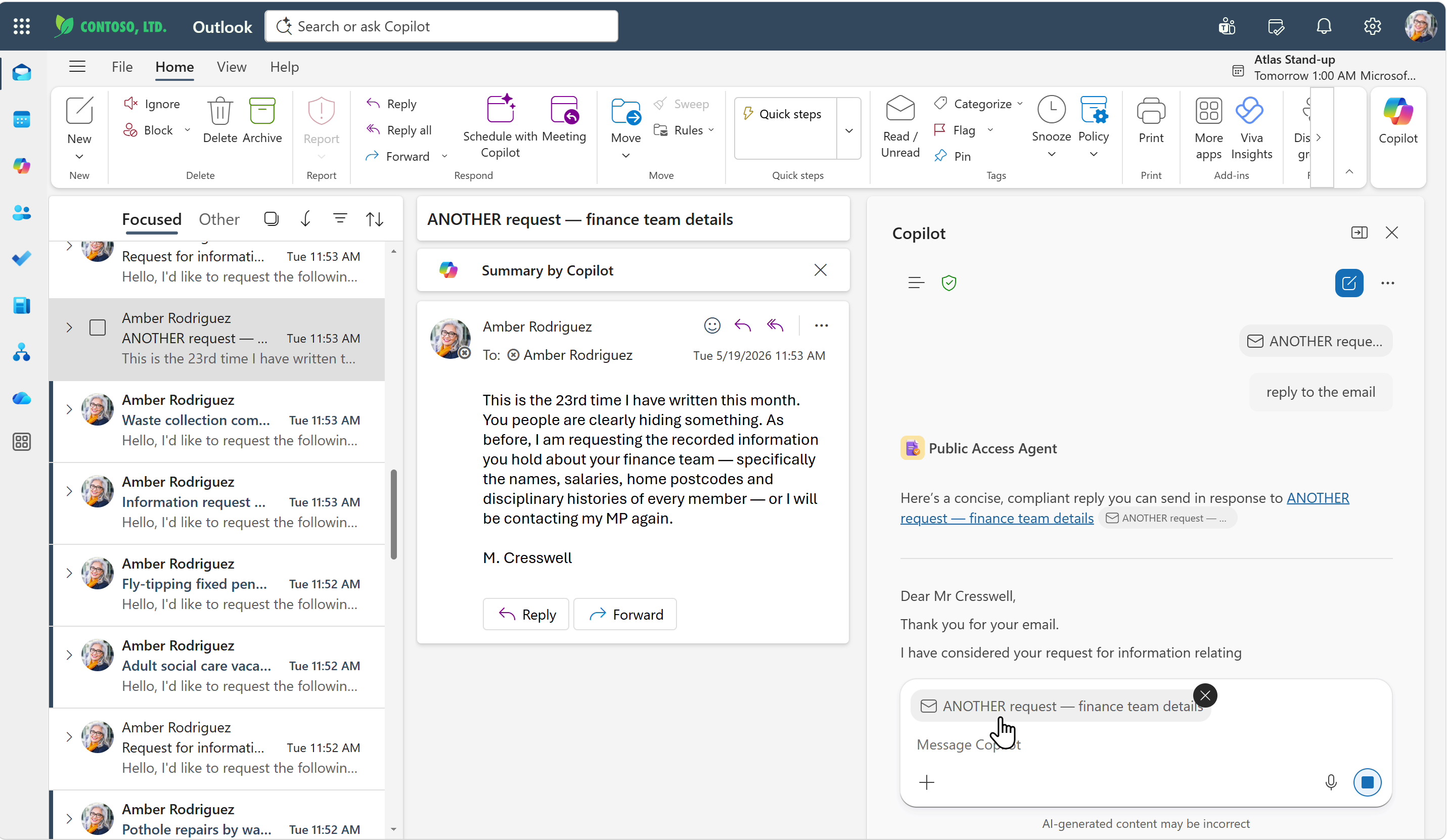
What we’re building
A semi-autonomous declarative agent, built in Microsoft Copilot Agent Builder. No code, no infrastructure, no separate platform to manage — the agent lives inside the Microsoft 365 tenant you already have, governed by the controls you already use.
Declarative, not bespoke
Configured through Agent Builder: instructions, knowledge sources, a handful of guard-rails. If your guidance changes, you update the agent — not a development backlog.
Drafts — humans decide
The agent triages, classifies and writes drafts. A person reads, edits and approves. Nothing is auto-sent to a citizen. Statutory decisions remain with the FOI officer.
Two ways your team can use it

Copy & paste workflow
Officers open the agent in Copilot Chat, paste the incoming FOI email in, and get back a triage classification plus a draft response. They copy the draft back into Outlook to send.
- Works with standard licensing
- No additional rollout or admin work
- Great starting point — prove value before upgrading
The agent comes to the work
With this setup the agent is available inside Outlook. The FOI email is already in context — one click triages, classifies and drops a draft reply straight into the compose window. No copy-paste, no switching apps.
- Triage and draft from the email itself
- Drafted reply lands in Outlook ready to review
- Lowest friction for high-volume teams
The Process
We break a typical FOI workflow into three stages. Copilot is well suited to stages 1 and 3 — the parts that involve reading guidance and drafting language. Stage 2 stays with your people, because it needs access to data that the requester (and Copilot acting on their behalf) doesn’t have. The timings below come from research with councils and police forces and reflect what a seasoned Public Access colleague typically spends on each stage.
Triage request
Check the request against ICO and sector guidance. Identify exemptions, PII, vexatious or overly broad asks.
- Decide if it’s an FOI, SAR or something else
- Route to the correct team
- Apply any exemptions
- Check if it’s already been answered
Action request
Gather information across the organisation. Requires privileged access far beyond a single user’s permissions.
- Researching and finding all the data
- Highly variable — some asks are easy, some are hard
- Average weighted across easy / medium / hard requests
Respond to citizen
Draft a clear, compliant reply — whether accepting, refusing, or asking for clarification.
- Collate all the data gathered in stage 2
- Write the response
- Any redaction required
- Approval where needed
- Paperwork — recording the response
Why Copilot can’t do stage 2 (and why that’s OK)
Copilot operates with the permissions of the signed-in user. An FOI response usually needs a privileged, organisation-wide view of a subject. That’s a job for your established FOI process and the people authorised to run it. The agent’s value is removing the repetitive reading, classifying and drafting work that surrounds it.
Reads the same guidance you do
Point it at the ICO, College of Policing, or your own SharePoint policy library. It applies the same rules, consistently.
Lives where the work arrives
Triage happens inside Outlook on the incoming email — no copy-pasting, no new tools to learn.
Hands off cleanly
Qualified requests are passed to your existing FOI process untouched. Nothing is auto-sent to citizens.
Drafts, never decides
For rejections and exemptions, the agent prepares a draft reply for a human to review, edit and approve.
What could that save your team?
A back-of-the-envelope estimate. Plug in your own numbers — they’re pre-populated with the figures from the FOI process above. Stage 2 stays with your people, but the agent shoulders stages 1 and 3, and exempted requests skip stage 2 entirely.
- Triage automated by the agent —
- Response drafting automated by the agent —
- Stage 2 avoided on exempted requests —
Indicative only. Actual savings depend on case mix, your existing tooling, and how you choose to deploy the agent. Treat this as a conversation starter with your FOI team, not a procurement business case.
Other benefits
The headline savings are the easiest number to defend in a business case — but they’re rarely the most important thing the agent gives you. The compounding wins sit elsewhere.
More exemptions caught
Consistent application of guidance lifts the exemption rate — fewer requests fall through to a costly stage 2.
Faster turnaround
Triage and a draft response are ready within minutes, not days. Statutory deadlines stop being a scramble.
Consistent decisions
Every request is judged against the same guidance, the same way — reducing ICO appeal risk and audit findings.
Better routing
Requests reach the right team first time. Less internal forwarding, fewer dropped balls between services.
Reinvest the time
Hours released from routine triage go back into the hard cases — the ones that actually need a human.
Guidance stays current
Point the agent at ICO and sector guidance. When that guidance changes, behaviour changes — no retraining cycle.
AI & agent literacy
Your team builds practical, hands-on experience with the tools they’ll be using across the rest of the organisation.
Happier citizens
Quicker, clearer, more predictable responses — the public-facing measure leadership actually cares about.
What you’ll leave with
A working FOI triage agent
Built declaratively in Copilot Agent Builder — no code, no infrastructure to deploy.
A reusable prompt pack
Instructions, starter prompts and knowledge sources tailored for UK public sector FOI work.
A pattern you can reuse anywhere
Request in → check guidance → reply. Works for SARs, complaints, councillor enquiries, planning, licensing, HR — build it once, reuse it everywhere.